
ADVERTISEMENT
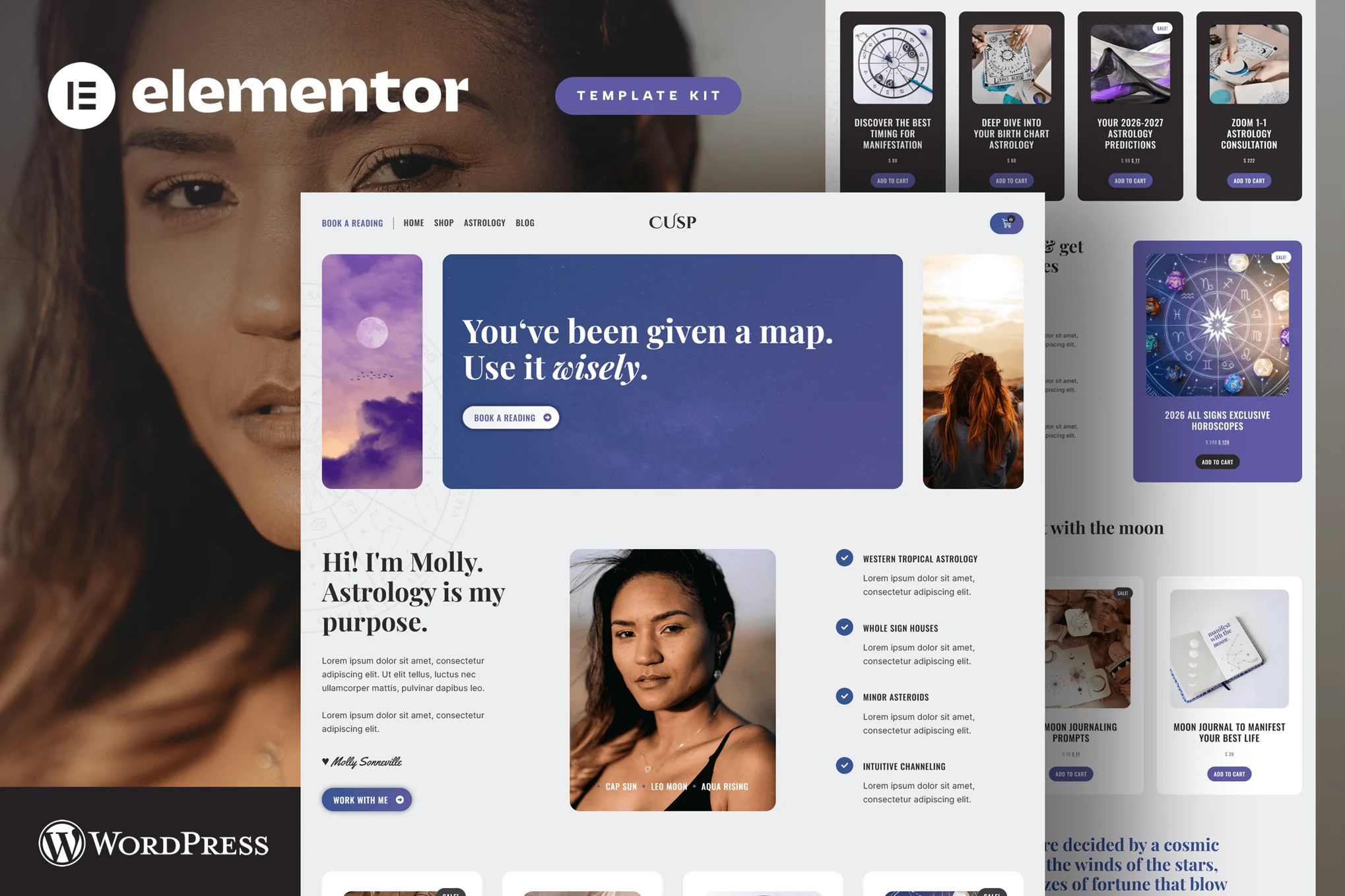
Cusp – Astrology & Horoscope Elementor Pro Template Kit
Pro Template

Cusp – Astrology & Horoscope Elementor Pro Template Kit

Uploaded by

mightyadmin
Last Updated on December 5, 2025

Step into Cusp — a fully customizable Elementor Pro template kit designed for astrology websites, horoscope platforms, and intuitive spiritual services.

If you offer astrology readings, daily horoscopes, or host astrology workshops, classes, and cosmic events, Cusp helps you create a beautiful online presence that is fully aligned with you.

Build a serene, responsive, and intuitive website that feels like a true sacred space — a digital portal where clients can explore your services, book astrology readings, and connect with your tribe.

With Cusp, you have everything you need to launch a high-converting, visually harmonious astrology website that reflects your unique cosmic guidance.

Why Cusp?

  • Responsive & aligned layouts that look stunning on every device.
  • Create your portal instantly with intuitive Elementor Pro templates.
  • Expand your tribe with pages designed for connection, trust, and engagement.
  • Sell astrology readings & horoscopes with beautiful, modern design.
  • Promote classes, workshops & events effortlessly.
  • Integrated booking flow so clients can schedule astrology readings with ease.

What’s Included

  • Elegant home page to welcome visitors to your cosmic space.
  • Services & booking pages to sell astrology readings or horoscope packages.
  • Events & classes sections — perfect for astrology workshops, group sessions, moon circles.
  • Horoscope blog — share weekly horoscopes, sign-by-sign insights, astro articles.
  • Subscription & RVSP forms — build community, grow your mailing list for monthly cosmic updates.
  • Shop pages — monetize your content: readings, courses, downloadable horoscopes or manifesting journals.

Let Cusp pave the way — so you can focus on guiding souls, not building pages.

Page Templates

  • Global Theme Styles
  • Home
  • Book A Reading
  • Header
  • Footer
  • Shop
  • Cart
  • Checkout
  • Thank you
  • My account
  • Single Product for WooCommerce
  • Products Archive for WooCommerce
  • Single Post
  • Posts Archive
  • Popup
  • Error 404

Save time and money: Why is a template kit better than a WordPress theme?

When you switch themes, you lost content, styling and features. Template Kits are theme-agnostic and only require evergreen plugins that change and update seamlessly along with WordPress.

  • True no-code customization with drag and drop visual builder
  • Customize fonts and colors in one place or fine-tune on individual elements
  • Modern, professional design
  • Fast-loading
  • Works with most Elementor themes.

Required Plugins (included)

  • Elementor
  • WooCommerce

Elementor Pro upgrade is required for some templates and features (not included)

How to Use Template Kits: This is not a WordPress Theme. Template kits contain the design data for Elementor only and are installed using the envato Elements plugin for WordPress or directly through Elementor.

Elementor Template Kits use the Envato Elements plugin to install.
ADVERTISEMENT

How to Install

Template Kits are Different from WordPress Premium Themes.

THIS IS NOT a WordPress Theme. Template kits contain the design data for Elementor only, and are installed using the Envato Elements plugin for WordPress or directly through Elementor.

Here are steps to successfully install a template kit:

  1. Click the “Download Template” button to download your kit.zip file. Once downloaded, do not unzip it. If you use Safari browser you may need to ensure “Open safe files after downloading” is disabled in the browser preferences, to avoid automatically unzipping the file after download.
  2. In your WordPress Admin, go to Settings > Permalinks and ensure “Post Name” is selected
  3. Go to Appearance > Themes > Add New and ensure the Hello Elementor theme is installed and activated. Hello Elementor is one of the best themes for use with Elementor, not because it is pretty, but because it gives 100% compatibility. Installing This will prompt you to install Elementor if you haven’t already.
  4. Go to Plugins and ensure Elementor and  “Template Kits Import” by Envato plugins are installed and at the latest version. If your kit requires Elementor Pro, it must be installed now and connected to your account.
  5. Go to Elements > Installed Kits and click Upload Template Kit Zip (or click your kit to view it)
  6. Check for the orange banner at the top and click “Install Requirements” to load any plugins the kit uses. 
  7. Click the “import” button on the Global Kit Styles first. This will setup the site settings with the right fonts and preset .
  8. Click Import on one template at a time in the order shown. These are stored in Elementor under Templates > Saved Templates and are re-used from here.

Building Your Header and Footer

If you have Elementor Pro:
  1. Go to Templates → Theme Builder.

  2. Import or open the Header template.

  3. Click Publish → Add Condition → Entire Site (or specific pages).

  4. Do the same for the Footer.

If you’re using Elementor Free:
  1. Install and activate Elementor Header & Footer Builder plugin.
  2. Go to Appearance → Header Footer Builder.
  3. Create a new header, select Elementor Canvas and edit with Elementor.
  4. Insert the imported Header template from Envato.

Assign it to the entire site.

Repeat for Footer.

Creating pages

  1. Go to Pages and create a new page and click Edit with Elementor
  2. Click the gear icon at lower-left (or Top-center) of the builder to view page settings and choose Elementor Full Width and hide page title.
  3. Click the gray folder icon to access My Templates tab and then Import the page you’d like to customize.
  4. Once you have built your homepage, you can set it under Settings > Reading by selecting “A Static Page.”

    Detailed Guide

Lifetime Access to the Entire Template Kit Library for ₦100,000

ADVERTISEMENT
ADVERTISEMENT

Similar Templates to Cusp – Astrology & Horoscope Elementor Pro Template Kit

We think you might be interested in the website templates kits below.

More Uploads by Odukoya Ibrahim

Subscribe for All-Access Pass

Ads Blocker Image Powered by Code Help Pro

Please Disable Your Ad Blocker

We have detected that you are using extensions to block ads. We spend a lot of money to bring these free templates to you.

Please support us by disabling your ads blocker or subscribe to All Access Pass to use Kits Bro without ads forever.

ADVERTISEMENT
close