
ADVERTISEMENT
Socialyze – Personal CV Elementor Pro Template Kit
Pro Template

Socialyze – Personal CV Elementor Pro Template Kit

Uploaded by

mightyadmin
Last Updated on December 5, 2025

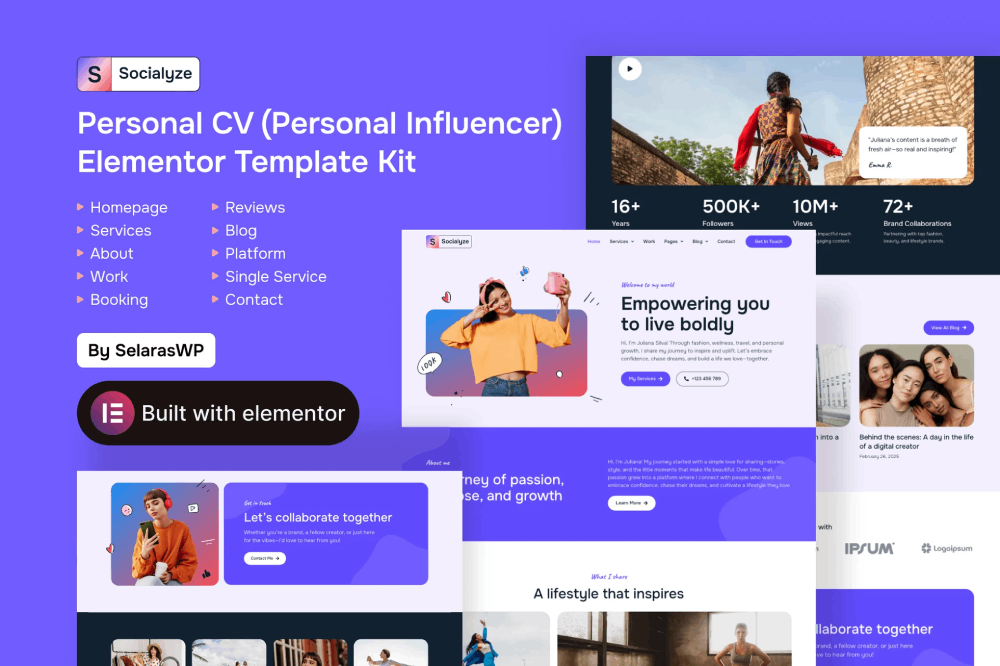
Socialyze is a modern Elementor Template Kit that perfect to create a WordPress-based website for Personal CV, CV/Resume specialy for Personal Influencer. This template has a professional design with a 100% responsive layout, is retina-ready, and is very easy to customize because using Elementor so you don’t need a single line of coding!

This template kit includes stunning carefully crafted 10 stunning templates, you can build your professional-looking company business website just a click away.

All Features

  • Styles and effects are created within Elementor panel, using no coding at all
  • 100% compatibility with the free version of Elementor
  • Save money! This kit uses Free Google Fonts and doesn’t require Elementor Pro
  • 10 Customizable Page Layouts
  • 18 well-designed Sections Templates
  • Sleek and minimalist Style
  • Stylish colors and hues
  • Responsive and excellent for Desktop, Laptop, and Mobile
  • Design of All main WordPress Widgets
  • Pixel Seamless Design
  • Easy to Use and Modify
  • Fully Fluid Responsive
  • Fully Editable Symbols
  • Responsive and professional support by dedicated team

Main Features Socialyze offers neat, clean, and professional template to create WordPress websites. You will need Elementor Pro as the premium plugin before being able to use this webpage-building kit. The whole package includes several main features, which are:

  • Homepage
  • About Us Page
  • Services Page
  • Single Service Page
  • Work Page
  • Booking Page
  • Reviews Page
  • Platform Page
  • Blog Page
  • Contact Us Page

Elementor Pro upgrade is required for some templates and features (not included)

 

ADVERTISEMENT

How to Install

Template Kits are Different from WordPress Premium Themes.

THIS IS NOT a WordPress Theme. Template kits contain the design data for Elementor only, and are installed using the Envato Elements plugin for WordPress or directly through Elementor.

Here are steps to successfully install a template kit:

  1. Click the “Download Template” button to download your kit.zip file. Once downloaded, do not unzip it. If you use Safari browser you may need to ensure “Open safe files after downloading” is disabled in the browser preferences, to avoid automatically unzipping the file after download.
  2. In your WordPress Admin, go to Settings > Permalinks and ensure “Post Name” is selected
  3. Go to Appearance > Themes > Add New and ensure the Hello Elementor theme is installed and activated. Hello Elementor is one of the best themes for use with Elementor, not because it is pretty, but because it gives 100% compatibility. Installing This will prompt you to install Elementor if you haven’t already.
  4. Go to Plugins and ensure Elementor and  “Template Kits Import” by Envato plugins are installed and at the latest version. If your kit requires Elementor Pro, it must be installed now and connected to your account.
  5. Go to Elements > Installed Kits and click Upload Template Kit Zip (or click your kit to view it)
  6. Check for the orange banner at the top and click “Install Requirements” to load any plugins the kit uses. 
  7. Click the “import” button on the Global Kit Styles first. This will setup the site settings with the right fonts and preset .
  8. Click Import on one template at a time in the order shown. These are stored in Elementor under Templates > Saved Templates and are re-used from here.

Building Your Header and Footer

If you have Elementor Pro:
  1. Go to Templates → Theme Builder.

  2. Import or open the Header template.

  3. Click Publish → Add Condition → Entire Site (or specific pages).

  4. Do the same for the Footer.

If you’re using Elementor Free:
  1. Install and activate Elementor Header & Footer Builder plugin.
  2. Go to Appearance → Header Footer Builder.
  3. Create a new header, select Elementor Canvas and edit with Elementor.
  4. Insert the imported Header template from Envato.

Assign it to the entire site.

Repeat for Footer.

Creating pages

  1. Go to Pages and create a new page and click Edit with Elementor
  2. Click the gear icon at lower-left (or Top-center) of the builder to view page settings and choose Elementor Full Width and hide page title.
  3. Click the gray folder icon to access My Templates tab and then Import the page you’d like to customize.
  4. Once you have built your homepage, you can set it under Settings > Reading by selecting “A Static Page.”

    Detailed Guide

Lifetime Access to the Entire Template Kit Library for ₦100,000

ADVERTISEMENT
ADVERTISEMENT

Similar Templates to Socialyze – Personal CV Elementor Pro Template Kit

We think you might be interested in the website templates kits below.

More Uploads by Odukoya Ibrahim

Subscribe for All-Access Pass

Ads Blocker Image Powered by Code Help Pro

Please Disable Your Ad Blocker

We have detected that you are using extensions to block ads. We spend a lot of money to bring these free templates to you.

Please support us by disabling your ads blocker or subscribe to All Access Pass to use Kits Bro without ads forever.

ADVERTISEMENT
close