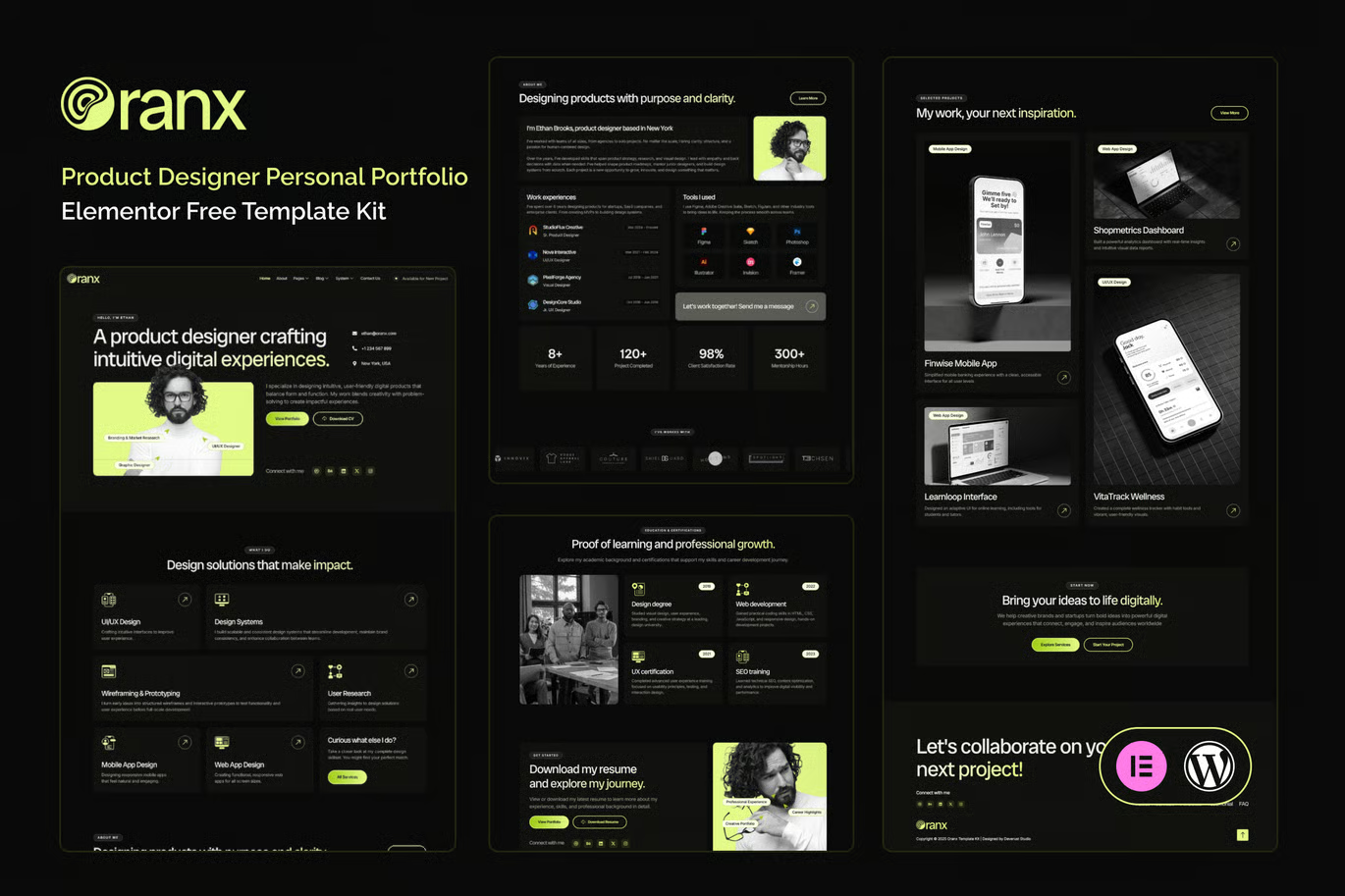
Oranx is an Elementor Template Kit crafted specifically for Product Designer Personal Portfolio websites built in WordPress. Leveraging the power of Elementor’s intuitive drag-and-drop builder and the flexibility of WordPress, Oranx allows you to create a stunning, fully customizable portfolio without writing a single line of code. Whether you’re showcasing UX case studies, UI mockups, or product prototypes, Oranx ensures seamless editing, rapid deployment, and ongoing scalability.
Designed with Product Designer Personal Portfolio professionals in mind, Oranx boasts a lead-generation-optimized layout, strategically placed call-to-action buttons, and one-click “Back to Top” navigation for superior user engagement. With clean typography and optimized breakpoints, your work shines on every device—desktop, tablet, or smartphone—while maintaining pixel-perfect consistency across major browsers and versions.
Featuring 22+ total pages—including dedicated Portfolio, Resume, and Case Studies sections—Oranx helps you tell your professional story with clarity and impact. Built on a robust design system, each component is thoroughly tested for cross-browser compatibility, ensuring your personal brand always looks its best. Elevate your online presence and convert visitors into clients with Oranx’s fully customizable, high-performance framework.
Suitable For:
- Freelance UX/UI Designers
- Product Design Agencies
- Design Consultants
Features:
- Unique & Clean Design
- Modern design based on design system
- 22+ ready to use templates
- Unlimited colors
- More than 900 ready fonts
- Fully Responsive Layout
- Fully Customizable
- Click to Go To Top
- Cross Browser Compatibility: Chrome, Firefox, Safari, Opera
- Dedicated Portfolio, Resume & Case Studies Pages
Templates Include:
- Global Theme Style
- Design Guideline
- Homepage
- Subscribe Blog Form
- Subscribe Form
- Review Form
- Contact Us
- Coming Soon
- 404
- Single Post
- Blogs
- Awards
- FAQ
- Podcast
- Testimonial
- Resume
- Pricing
- Portfolios
- Case Studies
- Contact Form
- Services
- About
- Footer
- Header
Required Plugin(included):
- Elementor
- The Plus Add-on
- ElementsKit Lite
- Gum Elementor Kit
- Metform
Template Kits are Different from WordPress Premium Themes.
THIS IS NOT a WordPress Theme. Template kits contain the design data for Elementor only, and are installed using the Envato Elements plugin for WordPress or directly through Elementor.
Here are steps to successfully install a template kit:
- Click the “Download Template” button to download your kit.zip file. Once downloaded, do not unzip it. If you use Safari browser you may need to ensure “Open safe files after downloading” is disabled in the browser preferences, to avoid automatically unzipping the file after download.
- In your WordPress Admin, go to Settings > Permalinks and ensure “Post Name” is selected
- Go to Appearance > Themes > Add New and ensure the Hello Elementor theme is installed and activated. Hello Elementor is one of the best themes for use with Elementor, not because it is pretty, but because it gives 100% compatibility. Installing This will prompt you to install Elementor if you haven’t already.
- Go to Plugins and ensure Elementor and “Template Kits Import” by Envato plugins are installed and at the latest version. If your kit requires Elementor Pro, it must be installed now and connected to your account.
- Go to Elements > Installed Kits and click Upload Template Kit Zip (or click your kit to view it)
- Check for the orange banner at the top and click “Install Requirements” to load any plugins the kit uses.
- Click the “import” button on the Global Kit Styles first. This will setup the site settings with the right fonts and preset .
- Click Import on one template at a time in the order shown. These are stored in Elementor under Templates > Saved Templates and are re-used from here.
Building Your Header and Footer
If you have Elementor Pro:
Go to Templates → Theme Builder.
Import or open the Header template.
Click Publish → Add Condition → Entire Site (or specific pages).
Do the same for the Footer.
If you’re using Elementor Free:
- Install and activate Elementor Header & Footer Builder plugin.
- Go to Appearance → Header Footer Builder.
- Create a new header, select Elementor Canvas and edit with Elementor.
- Insert the imported Header template from Envato.
Assign it to the entire site.
Repeat for Footer.
Creating pages
- Go to Pages and create a new page and click Edit with Elementor
- Click the gear icon at lower-left (or Top-center) of the builder to view page settings and choose Elementor Full Width and hide page title.
- Click the gray folder icon to access My Templates tab and then Import the page you’d like to customize.
- Once you have built your homepage, you can set it under Settings > Reading by selecting “A Static Page.”
Detailed Guide